
If you're having problems logging onto your Insta-Shop account, first make sure that you are actually logging onto your Insta-Shop account! If you clicked on an ORANGE map pin, that's a SASSIE mystery shop, and you are trying to log on to a DIFFERENT site where your Presto login won't work. For more information on logging onto a SASSIE system, please see this article.
To log in to your Presto InstaShops shopper account, follow these steps:
- Open a web browser and go to http://prestomap.com OR open the Presto Insta-Shopper app.
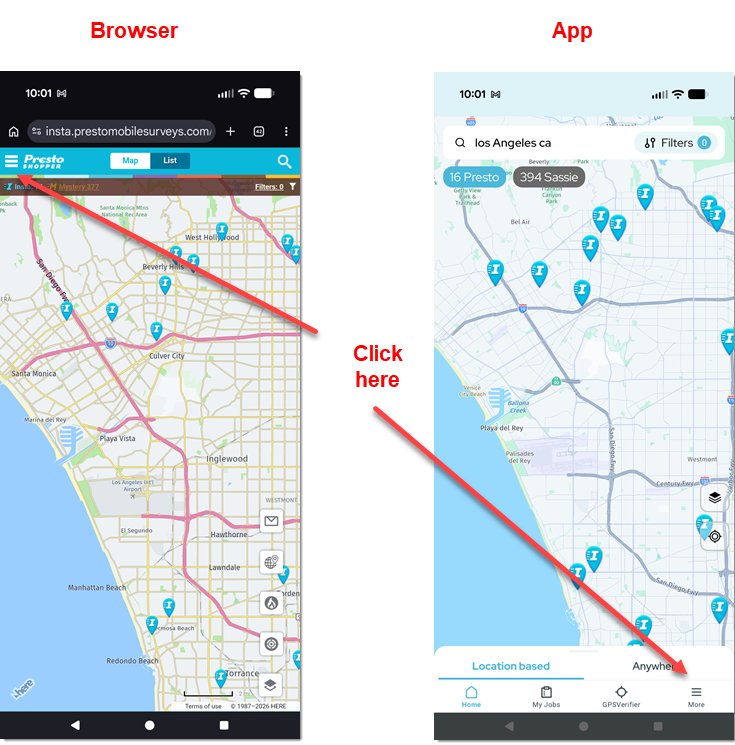
- If you are using a web browser, click on the menu icon (upper left corner). If you are using the app, click More (lower right corner):
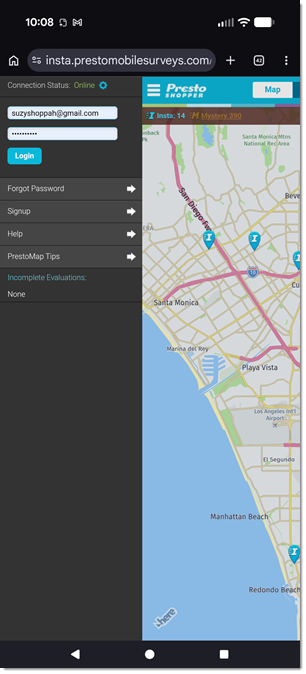
Note that you may be logged in already -- Presto remembers your login information and keeps you logged in on the same device and browser. - If you are using a browser, enter your login information and click Login.
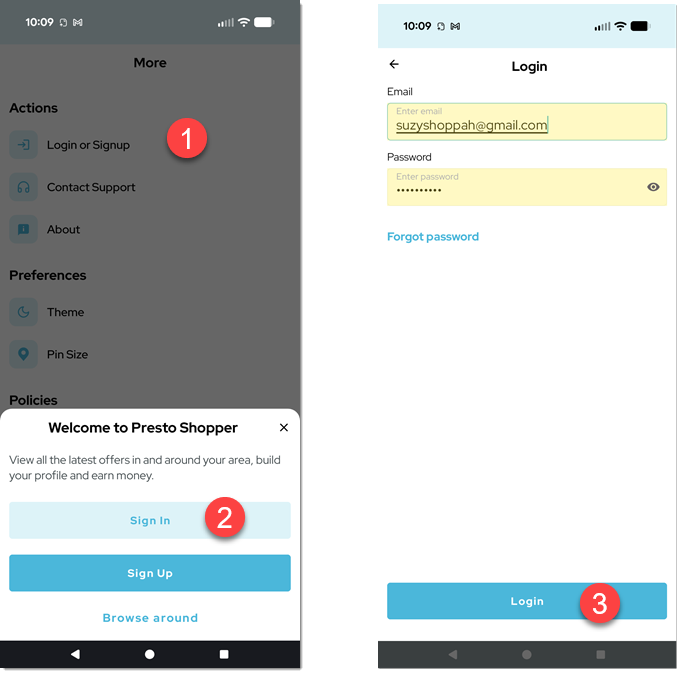
- If you are using the app, click Login or Signup. In the popup at the bottom, click Sign In. Enter your email address and password and click Login.
- If you get an error, click Forgot Password to reset your password. You will receive an email with a link that lets you reset your password